Invoice Generator
Create a professional invoice with Invoice Best Maker, the iPhone and iPad app: this free online invoice generator works in your browser, with no account and no credit card.
Everything is calculated on the device you are using. This page keeps a working draft in your browser, nothing is uploaded to a server, and no account is needed. Once it has loaded, the form and the PDF keep working without a network.
Stored in this browser only. Choosing a client fills the Bill to section.
Want a different look?
Six document designs redraw the same invoice: Classic, Modern, Minimal, Bold, Compact and Elegant. They change the header band, the accent color, the alignment and the row spacing — never your data or your totals. Pick one and the page re-renders with the numbers you already typed. Need a starting point for one specific trade? Explore all templates →
Fast, on-brand and paper-free
-
Fast and flawless
Fill in the fields once and watch the totals recalculate as you type: Qty times Unit price, line Tax, Discount, Shipping and Balance due add up without a spreadsheet open beside you. Dates, currency symbols and thousands separators stay consistent, so the document you hand over reads like it came from an accounting department rather than from a rush.
-
Invoices that represent you
Upload your Logo, list your Company details and set the Document type: invoice, estimate, receipt or pro forma. Your wording goes into Notes and Terms, your instructions into Payment terms. The 6 designs all hold the same data, so changing the look of a finished document takes a tap instead of a rebuild.
-
Ditch the paper clutter
A saved draft and a PDF replace the folder of paper slips. Number documents in one sequence — INV-0001, INV-0002 — so nothing is invoiced twice, and the Issue date and Due date put the deadline in front of the client. When the job is done, your record of it is one file you can find again.
How to create an invoice online in 7 steps
-
Step 1: Add your logo and business details
Drag a PNG, JPG, WebP or SVG logo (up to 2 MB) into the Logo field, then fill in Bill from: Company, Address, Email, Phone and Tax ID. Clients read this block first, so keep it identical to what is on your estimates and receipts.
-
Step 2: Set the document type and number
Choose the Document type — Invoice, Estimate, Receipt or Pro forma. Check the Number: INV-0001 on a first document, a new one suggested each time. Then set the Issue date and, when payment has a deadline, the Due date.
-
Step 3: Enter the client details
Type the Client name and, under Bill to, the Address, Email and Phone of the person who pays. A client you saved in this browser can be filled in one step, which keeps the name spelled the same way on every document.
-
Step 4: Add line items with quantity and price
In each line, write the Description, the Qty (hours, days, pieces) and the Unit price. Set a line Discount or Tax percentage when that item needs one. Duplicate a line to reuse it, and add lines until the whole job is covered.
-
Step 5: Apply tax, discount and shipping
Check the line Tax values, then add the document-level figures: a Discount in amount or percentage mode, and Shipping. Subtotal, Tax and Balance due change with every keystroke, so you see the client's final amount before anyone has to ask.
-
Step 6: Pick the currency and payment info
Set the Currency — 20 currencies are available, and every amount is reformatted at once. Under Payment terms, write how you want to be paid: bank transfer, PayPal, cash or card. Notes and Terms are separate fields for delivery details and conditions.
-
Step 7: Preview and download the PDF
Open Preview to see the A4 page exactly as the client will, then save it: the print dialog offers Save as PDF and writes the file to your device. Keep the file, attach it to an email, or print a paper copy.
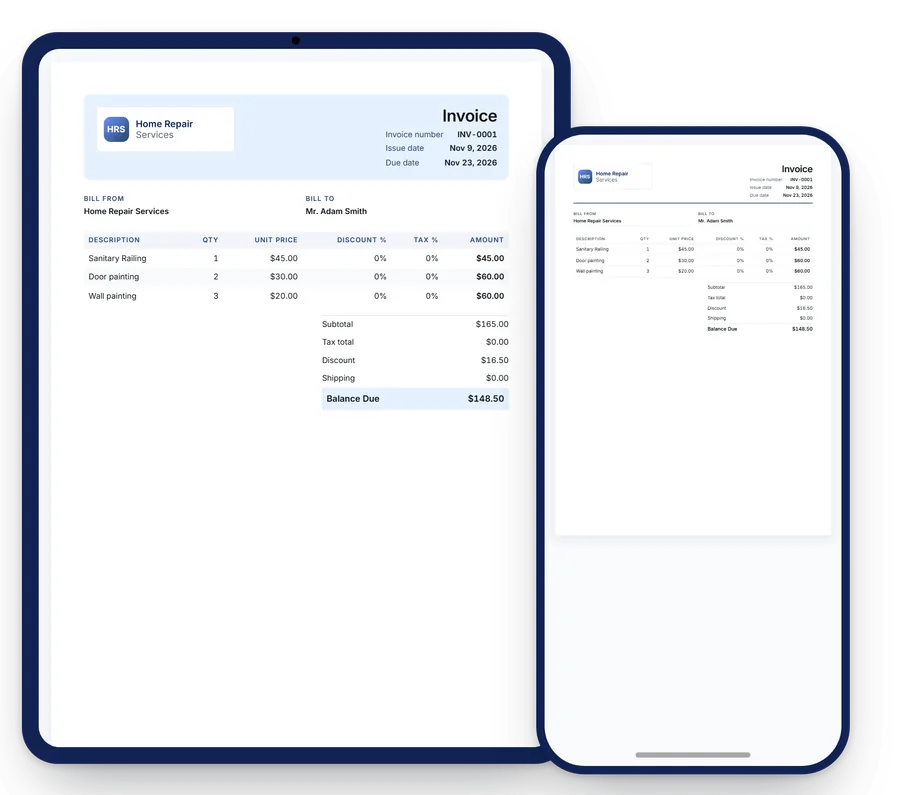
The essential elements of a professional invoice
-
Invoice headline
The word Invoice at the top tells the reader what the document is before they read a single line. The same placement carries Estimate, Receipt or Pro forma, because an estimate and an invoice are not the same promise. Keep the label plain: a clever heading that hides the document type only slows the payer down.
-
Your logo
Your logo is where the eye lands first, and it makes a plain A4 page look issued by a real company rather than forwarded from a personal inbox. Place it above your own details, keep the original colors, and use a file that stays sharp on paper: PNG, JPG, WebP or SVG up to 2 MB.
-
Invoice details
A number, an issue date and a due date turn a request into a record. One unbroken number sequence — INV-0001, INV-0002 — lets you look a payment up two years later, and a Due date gives the client a deadline instead of a vague expectation. State the Currency once, clearly, and let the symbol handle every amount below it.
-
Bill from
This block is you: Company, Address, Email, Phone and, where your region asks for it, Tax ID. Clients, bookkeepers and tax offices all copy from it, so completeness beats brevity. A contact address that someone actually reads shortens the exchange when a question arrives about a line on the document.
-
Bill to
Address the document to the person or company that owes the money, with the Address they know and the Email that pays you. Purchasing departments return paperwork that is missing a tax number or a postal address, so ask once at the start of a relationship and keep the answer for every later document.
-
Line item descriptions
Write what the client is paying for in words they recognize: Door painting, Wall painting, two hours on site. Specific lines match the estimate they approved, so nobody has to ask what Sanitary Railing means. Qty and Unit price on the same line let anyone repeat the arithmetic without a calculator.
-
Payment options
Bank transfer, PayPal, cash or card: name the method, the deadline and anything the payer should reference, such as the document number. A confused payer pays late; a payer with a date and the right numbers pays on it. Keep this block near the total, because that is where the eye finishes reading.
-
Total due
Balance due is the number the client acts on, so give it its own line, right aligned, with Subtotal, Tax, Discount and Shipping above it. One currency, two decimal places, and no second total competing for attention. Clear totals cause payments; unclear totals cause phone calls.
Export options: print-ready PDF or in-app sharing
Nothing leaves this page to build your file. Download opens the browser print dialog, where a print stylesheet renders only the A4 document with normal margins, and Save as PDF writes the file to your device. The same output goes straight to paper or to a network printer. Open Preview first if you want to see where a long list of line items lands on the page. No copy of your invoice is emailed, hosted or stored by this website.
The app covers day-to-day invoicing on a phone: documents there can be printed, sent to a client, or shared from iPhone and iPad into another app. Editable Word and Excel layouts live on the invoice template gallery: they are starting points you open here in the browser, not files this site exports. Browse invoice templates to see them.
Your data stays in your browser
The invoice generator runs entirely in your browser. Every total is worked out on the device in front of you, and the form never sends a request carrying your data: there is no sign-up step, no account to create, no inbox to confirm. Drafts are stored in your browser localStorage; nothing is uploaded to a server. That is also how a draft survives a reload or a closed tab — it is read back from this browser, on this device, which means clearing site data clears the draft as well. No cookies and no analytics scripts run on this site.
Because we hold no copy, we cannot restore a draft for you: download the PDF and keep it where you keep your records. Documents you save in the app are kept in the app's cloud storage. Details are in our Privacy policy.
Why use an online invoice generator instead of a spreadsheet?
A spreadsheet is a grid of empty cells; an invoice is a document with obligations. That difference is the whole argument.
In a spreadsheet you personally own the layout, the formulas and the numbering. Miss one cell in a tax column and the total looks wrong to the person you are asking to pay. Leave out a due date and the deadline exists only in your head. Duplicate last month's file for this month's job and you inherit its number, its outdated address, sometimes its old rates. Nothing checks this work for you, and the cost surfaces later as a delayed payment or an awkward phone call.
A generator inverts the arrangement. The structure is fixed and correct before you type: Description, Qty, Unit price, Discount, Tax, Shipping, Balance due, each figure recalculated the moment you change it. The Document type, the numbering sequence and the Currency stay consistent from one document to the next, which is exactly what a bookkeeper or a tax office wants to find. The design work is finished already, in 6 layouts that carry your logo and print on A4 with real margins.
None of that makes spreadsheets wrong. They are better at analysis: cost models, a project budget, comparing two suppliers. For invoicing, the useful question is what you would rather think about — whether column D points at the right tax cell, or whether the client received a document that reads like yours. When the second answer matters more, a form that prints a clean PDF is the shorter route.
Invoice generator questions answered
What is an online invoice tool and who is it for?
It is a form that turns your details into a finished, printable document: you fill in the fields, it handles layout, numbering and totals. Freelancers, contractors and small businesses use it when a job is finished and an invoice is needed today, without waiting for an accountant or setting up software first.
Can I customize how the invoice looks?
Yes. Upload your logo, pick one of 6 designs and switch the Document type between Invoice, Estimate, Receipt and Pro forma. Your company details, payment terms, notes and currency are all yours; the layout only keeps them aligned on A4. A design change applies to data you already entered, so you can compare looks without retyping anything.
Does it work for one line item or one hundred?
Both. A single line is fine for a small job, and longer lists scroll on screen and print without breaking the page layout. For very long invoices, summarize a stage in one line with its own Qty and Unit price, or issue two documents — one per stage — so each one stays readable for the person who approves it.
Is the generator really free to use?
Yes, on this page: no account, no credit card and no time limit on filling the form or saving a PDF. The iPhone and iPad app is free to download and includes 3 documents at no cost. Unlock unlimited documents with a subscription from $4.99 per month — or choose $29.99 per year or a one-time $99.99 lifetime license. Prices shown in the App Store may change.
Where is my invoice data stored?
In this browser only. What you type stays on the device, the draft is kept in localStorage so a reload does not lose it, and nothing is uploaded to a server. This site sets no cookies and runs no analytics. Because there is no copy on our side, download the PDF for anything you must keep; the full picture is in our Privacy policy.
Can I create invoices on iPhone or iPad?
Yes — this page works in the browser on iPhone, iPad and desktop, and the app is made for iPhone and iPad. In the app you keep saved clients and line items, follow document statuses and share a finished document from inside it. Customers rate the app 4.6 out of 5 from 163 ratings on the App Store (as of November 2026).
Get the full app on iPhone and iPad
Fill this form whenever you need it. Invoice Best Maker keeps your clients, line items and documents ready on iPhone and iPad, so the next invoice starts one tap away.
Made for iPhone and iPad